5 Best App Blockers for iPhone in 2026 (Honest Comparison)
By Aptnotion Team · June 2026
You set a Screen Time limit on Instagram. One hour. Strict.
Then at 10 PM, the gray overlay appeared — and you tapped “Ignore Limit for Today” without even thinking.
Sound familiar? You’re not alone. iOS Screen Time was built as a gentle nudge, not a hard barrier. The “Ignore Limit for Today” option is one tap away — and that one tap undoes every intention you had.
That’s why third-party app blockers exist. They use Apple’s FamilyControls framework to create restrictions that are genuinely harder to bypass. But not all of them work equally well — and some are dramatically overpriced for what they offer.
We tested the top options in 2026. Here’s the honest breakdown.
Quick Comparison Table
| App | Best For | Free Tier | Price/Year | Unique Feature |
|---|---|---|---|---|
| ChargeLock | Charging-triggered blocking | ✅ 5 apps | $19.99 | Auto-locks when charging |
| Opal | Analytics + group sessions | Limited | $79.99 | Deep Focus mode |
| AppBlock | Schedule-based blocking | ✅ 4hr/day | ~$30 | Location/Wi-Fi triggers |
| ScreenZen | Free users | ✅ Almost all | Free | Zen time scheduling |
| One Sec | Habit-break friction | ✅ Limited | ~$20 | 1-second pause before opening |
1. ChargeLock — Best for Automatic Trigger-Based Blocking
Price: Free (5 apps) · $1.99/week · $19.99/year
Platform: iOS 16+
App Store: Download ChargeLock ⚡
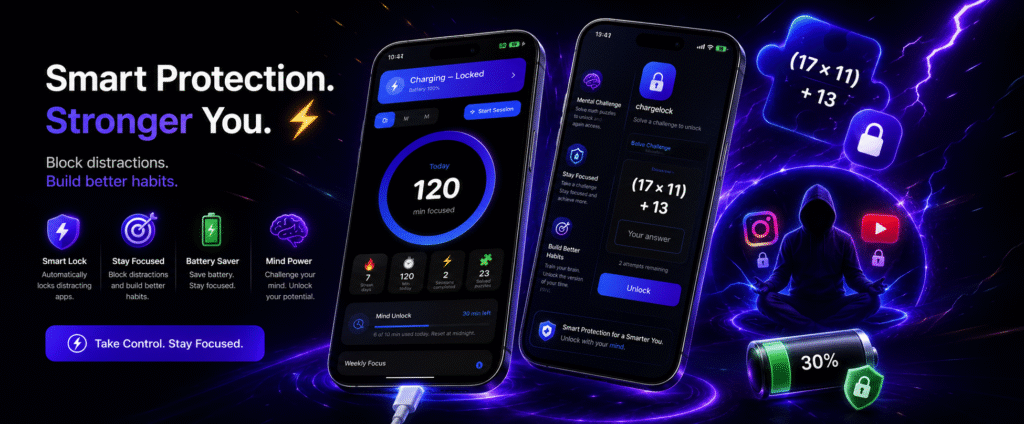
ChargeLock takes a completely different approach from every other app on this list. Instead of asking you to manually start a focus session, it uses your phone’s physical state as the trigger.
Plug in your charger → apps lock automatically.
The idea is simple but surprisingly effective: most people charge their phones 2–3 hours a day, usually while sitting still. That’s wasted focus time. ChargeLock turns it into forced downtime.
There’s also a second trigger no other app has: low battery lock. When your battery drops below 30% (configurable), ChargeLock blocks distracting apps automatically. Behaviorally interesting — low battery already creates anxiety, and blocking distractions at that exact moment doubles the nudge to put the phone down.
The unlock mechanic is the real differentiator. To get back into a blocked app, you solve a math or logic challenge — something like 7 × 9 + 12 = ?. Easy ones take 5 seconds. Hard ones make you pause and actually think. That tiny cognitive friction is enough to break the reflex loop and ask yourself: do I actually need to open this right now?
Most of the time, you don’t.
What we liked:
- Automatic triggers — no manual session required
- Math challenge unlock is genuinely unique and effective
- Smart Screen Time suggestions (“You’ve used Instagram 47min above your average”)
- 100% on-device — no account, no data uploaded
- Generous free tier (5 apps)
- Affordable Pro at $19.99/year — cheapest on this list
What could be better:
- No web blocking (iOS limitation for all apps)
- No cross-platform (iPhone only)
- Newer app — fewer reviews than established competitors
Best for: People whose biggest problem is mindless phone use during charging time, or anyone who wants blocking to happen automatically without willpower.
2. Opal — Best for Analytics and Deep Focus
Price: Limited free · $79.99/year
Platform: iOS only
Opal is a focus and screen-time app that blocks distracting apps on iPhone. You can create “focus blocks” — scheduled periods to prevent access to specific apps. It also provides a “focus score” showing how much time you spend focused versus distracted, with real-time stats and weekly reports.
Opal is the most polished app in this category. The interface is clean, the analytics are genuinely useful, and Deep Focus mode is one of the harder-to-bypass blocking systems on iOS.
The problem? The price — around $99.99 per year on the Pro plan — and a layer of features most users won’t touch. For a solo user who just wants to stop opening TikTok, $80–100/year is hard to justify when cheaper options exist.
What we liked:
- Best-in-class analytics and focus score
- Group focus sessions (accountability with friends)
- Polished, premium UI
- Scheduled blocks work reliably
What could be better:
- Most expensive option by a large margin
- No meaningful free tier — most people looking for Opal alternatives in 2026 cite the price as the primary reason
- No unique unlock friction — sessions run on the clock, not on intent
Best for: Power users who want deep analytics and are willing to pay for a premium experience.
3. AppBlock — Best for Schedule and Location-Based Blocking
Price: Free (4hr/day, 2 profiles) · ~$30/year
Platform: iOS + Android
AppBlock is built around profiles — preconfigured blocking scenarios that activate automatically based on time, location, or Wi-Fi network. Work, Study, Sleep, Family Dinner — each activates on its own schedule. Location-based blocking locks distracting apps automatically when you arrive at the office or gym.
AppBlock is the most flexible option for people whose problem is time-of-day or location-based. If you need Instagram blocked from 9AM–6PM on weekdays, AppBlock handles this better than anyone.
What we liked:
- Location and Wi-Fi triggers are genuinely useful
- Pomodoro integration built in
- Reasonable pricing
- Cross-platform (better on Android, but iOS works)
What could be better:
- No friction delay — the schedules hold if you password-protect settings, but there’s no unlock challenge
- UI feels less polished than Opal or ChargeLock
- Android-first history shows in some iOS UX decisions
Best for: People whose problem is specific time windows (work hours, bedtime) rather than impulse control.
4. ScreenZen — Best Free Option
Price: Almost entirely free
Platform: iOS
ScreenZen stands out as the only app blocker where nearly all features are free. It offers a high level of customization and uses Apple’s Screen Time mechanics under the hood.
If you’re not ready to pay for a blocker yet, ScreenZen is the place to start. “Zen time” scheduling lets you set dedicated disconnection periods, and the free tier is genuinely generous compared to competitors.
What we liked:
- Best free tier in the category by far
- Solid customization
- Good starting point for new users
What could be better:
- Lacks the ultimate friction needed for severe social media addiction — blocks are relatively easy to work around
- No unique trigger mechanism
- Analytics are basic
Best for: Users who want to try app blocking without spending money, or anyone with mild screen time concerns.
5. One Sec — Best for Habit-Break Friction
Price: Limited free · ~$20/year
Platform: iOS + Android + Mac
One Sec takes a minimalist approach: when you open a blocked app, it forces a one-second breathing pause before letting you in. No math problems, no timers — just a deliberate moment of friction.
One Sec is research-backed — peer-reviewed studies have measured its effectiveness at reducing impulsive app opens. For users who want a lighter touch than hard blocking, this is a smart choice.
What we liked:
- Research-backed effectiveness
- Very lightweight — doesn’t feel punishing
- Cross-platform including Mac
- Affordable
What could be better:
- Friction is light — determined scrollers will push through
- No automatic triggers
- No analytics
Best for: Users who want a gentle nudge rather than hard blocking, or anyone who resisted harder blockers in the past.
Which App Blocker Should You Download?
Here’s the honest guide based on your specific problem:
You doomscroll while your phone charges → ChargeLock. The automatic charging trigger solves exactly this problem without any willpower.
You want the deepest analytics and don’t mind paying → Opal. Best-in-class data, but expensive.
Your problem is specific time windows (work hours, bedtime) → AppBlock. Schedule and location triggers are its specialty.
You want to try blocking for free → ScreenZen. Most generous free tier.
You want light friction, not hard blocking → One Sec. Research-backed, gentle approach.
The Real Problem with Most App Blockers
After testing all of these, one pattern is clear.
This isn’t a willpower failure. It’s a design failure. Most app blockers put the decision to block in your hands — you have to remember to start a session, set a timer, or configure a schedule. That means the same brain that wants to scroll Instagram is also the brain deciding when to block Instagram.
ChargeLock sidesteps this entirely by using a physical event (charger connected, battery low) as the automatic trigger. You don’t decide to focus — your phone decides for you.
Combined with the math unlock challenge — which forces a moment of conscious thought before you can scroll — it’s the only app on this list that addresses both the trigger problem and the bypass problem at once.
Try ChargeLock Free
ChargeLock is free to download with a generous free tier — lock up to 5 apps, unlimited manual sessions, charging auto-lock.
Download ChargeLock on the App Store ⚡
No account required. No data collected. Everything stays on your iPhone.
Published by Aptnotion — independent iOS app studio. We built ChargeLock because we had this exact problem. We’re transparent about that, which is why we included honest cons for our own app and fair coverage of competitors.
Have a question or a different experience with any of these apps? Email us at support@chargelock.app
Related posts:
- Why You Doomscroll Every Time You Charge Your Phone (And How to Stop)
- Dopamine Detox: Does It Actually Work?
- How I Built ChargeLock in 6 Weeks Using SwiftUI and FamilyControls